---
updatedAt: 2026-06-18T15:20:18.000Z
---
# Authenticated API Usage
We use a `Bearer Token` to authenticate API calls.
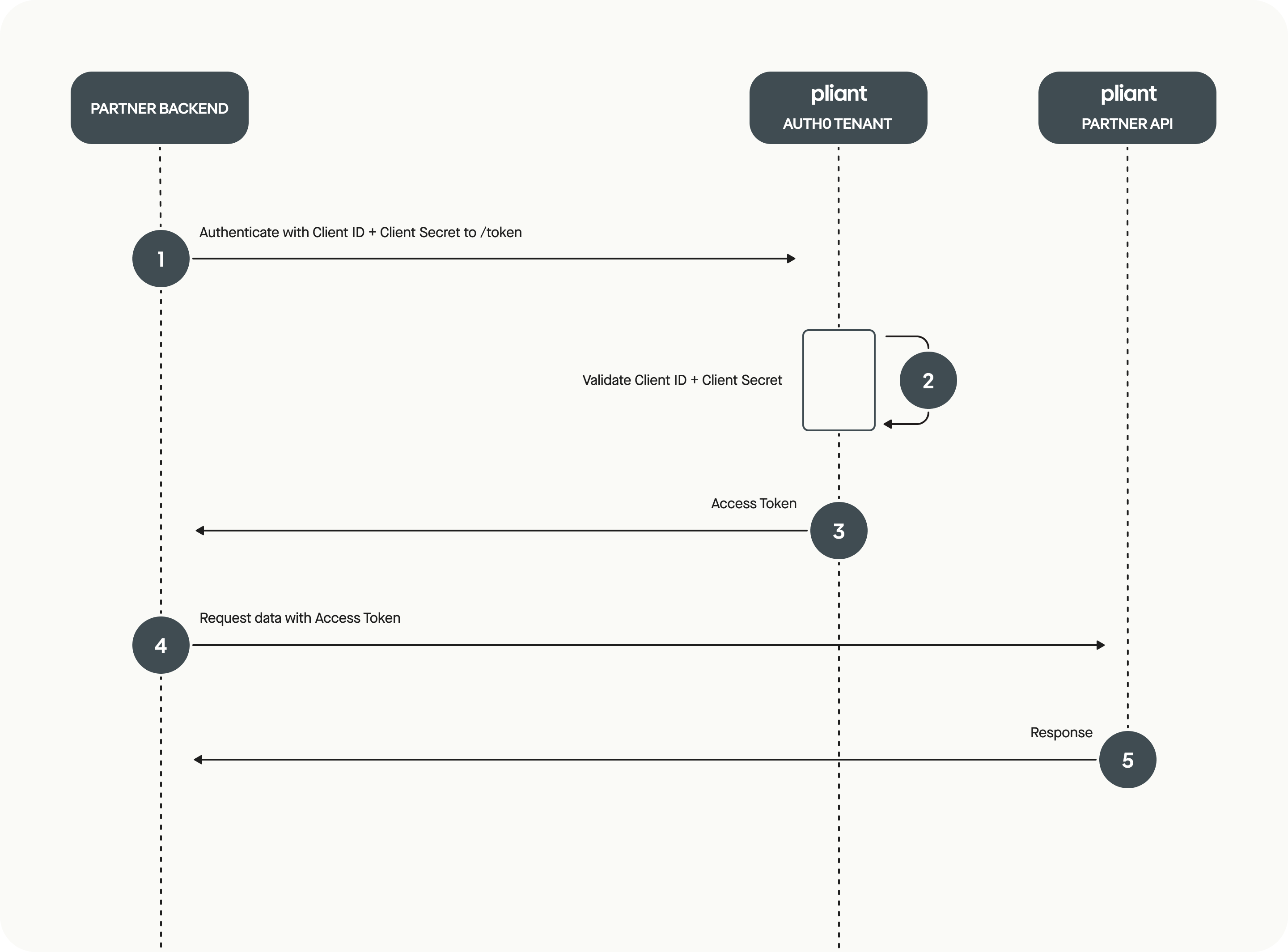
This token is acquired using the [OAuth 2.0 Client Credentials flow](https://auth0.com/docs/get-started/authentication-and-authorization-flow/client-credentials-flow).
## Getting a Bearer Token
> 📘 Only Backend to Backend Communication allowed
>
> The authorization flow must be handled **exclusively by a secure backend**. For security reasons, **web frontends and mobile apps** must not call the API directly or expose the clientSecret.
1. Use your `clientId` and `clientSecret` (provided during onboarding) to obtain a `Bearer Token`.
2. This token is valid for **all organizations** you've been authorized for in the given environment (sandbox or production).
3. The token must be included in the `Authorization` header for **every API request**.
## Access Token Request Quotas
Based on guidelines from Auth0 regarding fine-grained token quotas, a response header is present every time an access token is requested, for example:
```
Auth0-Client-Quota-Limit: b=per_hour;q=42;r=42;t=3600,b=per_day;q=100;r=100;t=86400
```
### Header format explanation:
* **b** – bucket type (per\_hour, per\_day)
* **q** – quota limit for the bucket
* **r** – remaining requests in the bucket
* **t** – time (in seconds) until the bucket resets
### Behavior When Quota Is Exceeded
Exceeding the quota will result in `HTTP 429 Too Many Requests`:
```
{
"error": "too_many_requests",
"error_description": "Client quota exceeded"
}
```
> ⚠️
>
> **Ensure to cache and reuse valid access tokens rather than requesting new ones.**
***
## Example cURLs
> 📘 HTTPS is Mandatory
>
> All API communication must use HTTPS. Plain HTTP is not supported.
```json Production
curl --location --request POST 'https://infinnityprodinternal.eu.auth0.com/oauth/token' \
--header 'Content-Type: application/json' \
--data-raw '{
"client_id": "YOUR CLIENT ID",
"client_secret": "YOUR CLIENT SECRET",
"audience": "api.getpliant.com/api/integration",
"grant_type": "client_credentials"
}'
```
```json Sandbox
curl --location --request POST 'https://infinnitystaginginternal.eu.auth0.com/oauth/token' \
--header 'Content-Type: application/json' \
--data-raw '{
"client_id": "YOUR CLIENT ID",
"client_secret": "YOUR CLIENT SECRET",
"audience": "api.staging.infinnitytest.com/api/integration",
"grant_type": "client_credentials"
}'
```
```json Response Example
{
"access_token": "ey...0A",
"expires_in": 86400,
"token_type": "Bearer"
}
```
The token remains valid until its TTL (e.g., expires\_in: 86400 = 24 hours) is reached. It will not be invalidated earlier.
## URLs Breakdown
### Production
| Type | URL |
| :------------ | :------------------------------------------------------- |
| Base | `https://partner-api.getpliant.com/api/` |
| PCI Base | `https://pci-api.getpliant.com` |
| Token Request | `https://infinnityprodinternal.eu.auth0.com/oauth/token` |
| Audience | `api.getpliant.com/api/integration` |
### Sandbox
| Type | URL |
| :------------ | :---------------------------------------------------------- |
| Base | `https://sandbox.partner-api.getpliant.com/api/` |
| PCI Base | `https://pci-sandbox.partner-api.getpliant.com/` |
| Token Request | `https://infinnitystaginginternal.eu.auth0.com/oauth/token` |
| Audience | `api.staging.infinnitytest.com/api/integration` |
## Additional Resources
* Access Tokens
* Client Credentials Flow