

Card
Credit cards are one of the main entities for Pliant. The most important things to know about Pliant credit cards are
- the different
cardConfigs, which determine the type of the card and how it looks - the
limits on those cards and how often they renew - the
statusof the card and - optional
cardControls, to block or allow certain merchants for instanceModel
Card Object
Below you find all card fields grouped into meaningful categories.
1. Identification & Ownership
| Field | Type | Description |
|---|---|---|
cardId | uuid | Unique identifier for the card. |
cardRequestId | _uuid- | ID of the card request, if applicable. |
organizationId | uuid | Unique identifier of the organization. |
cardholderId | uuid | Unique identifier of the cardholder. |
cardAccountId | uuid | Unique identifier of the card account the card belongs to. |
type | string | Type of card, e.g. VIRTUAL, PHYSICAL, SINGLE_USE (deprecated). |
2. Card Details
| Field | Type | Description |
|---|---|---|
cardConfig | string | The card config describes the configuration and look of the card you want to issue. Per default, Pliant offers the following card configs. Please keep in mind that not all of those might be relevant or applicable for you. If in doubt, double-check with Pliant directly. Here are some sample card configs:
|
status | string | Current lifecycle status of the card. See reference for currently available card states. |
label | string | Optional card label (virtual cards only). |
purpose | string | Purpose for single-use cards. |
refNum | string | Last 4 digits of the card number. |
maskedPan | string | Masked card number for display. |
panAlias | string | Alias/token representing the PAN. |
3. Issuance & Validity
| Field | Type | Description |
|---|---|---|
issuingDate | date-time | Date when the card was issued. |
expiryDate | date-time | Date when the card expires. |
validFrom | _date-time | Starting date/time from which the card is valid. |
validTo | date-time | Ending date/time until which the card is valid. |
validTimezone | string | Timezone associated with the validity period. |
shippingDate | date-time | Shipping date for physical cards. |
4. Limits & Balances
| Field | Type | Description |
|---|---|---|
limit | object | Spend limit per renewal period (value, currency). The card limit defines the maximum total amount that can be spent with a card within the limit frequency renewal period. The limit can be up to the organization's overall limit. For instance an organization with a limit of 1,000,000 EUR can have a card with a limit up to 1,000,000 EUR. It is also possible to have more than one card with the maximum limit. For example you can have two cards each with a limit of 1,000,000 EUR. The card limits are not added up on creation, only the transactions happening on the card are added up and checked against the organization's overall limit. |
transactionLimit | object | The transaction limit defines the maximum amount that can be spent with a card per single transaction. Please note that subsequent incremental charges to a card (common for e.g. hotel bookings) will be counted as a single transaction for this purpose. The transaction limit can be up to the card's limit. For instance a card with a limit of 1,000 EUR can have a transaction limit up to 1,000 EUR.value (decimal)currency (string) |
maxTransactionCount | integer | Maximum number of allowed transactions. |
spendingBalance | object | The amount that has already been spent by the cardholder using the card since the start of the limit periodvalue (decimal)currency (string) |
availableBalance | object | The available amount that can be used in payments until the end of the limit periodvalue (decimal)currency (string) |
limitPeriodEnd | date | End of the current limit period. |
limitRenewDate | date | Date when the limit will renew. |
limitRenewFrequency | string | MONTHLY - The card limit is renewed every calendar monthQUARTERLY - The card limit is renewed every calendar quarterANNUAL - The card limit is renewed every yearTOTAL - The card limit is never going to be renewed. After the limit is spent the card cannot be used anymore.. |
nextLoadDate | date-time | Next scheduled top-up/load date. Only relevant for benefit cards. |
5. Tokenization & Network Metadata
| Field | Type | Description |
|---|---|---|
token | string | The card networks (internal) id for this card. Necessary when fetching sensitive card data for this card. |
productRef | string | Internal reference to the underlying card product. (deprecated) |
6. Design & Presentation
| Field | Type | Description |
|---|---|---|
cardDesign | string | Visual design assigned to the card. |
cardDesignId | uuid | ID of the card design asset. |
cardDesignLogoName | string | Logo or branding applied to the card. |
7. Controls, Flags & Behavior
| Field | Type | Description |
|---|---|---|
cardControls | object | Controls restricting merchants, time, location, etc. |
platformFee | boolean | Indicates if the card is used to collect platform fees. |
benefit | boolean | Indicates if special benefit handling applies. |
copilots | array | Copilots/users with (potential) access to the card. |
8. Teams & Projects
| Field | Type | Description |
|---|---|---|
teamId | uuid | ID of the team the card is associated with. |
teamName | string | Team name. |
projectId | uuid | ID of the associated project. |
projectName | string | Project name. |
9. Replacement Lifecycle
| Field | Type | Description |
|---|---|---|
replacedByCardId | uuid | ID of the card that replaces this one. |
replacedCardId | uuid | ID of the card this one replaced. |
replacementReason | string | Reason for replacement (e.g., lost, stolen, upgrade). |
Card Configs / Types
The cardConfig is the full configuration of a card in Pliants platform. It entails for example the network, the type of the card, whether it is physical or virtual and also how the card is displayed or printed.
Please note, that not all listed card configurations might be available to you. It depends on the setup of the organization and partnership. To get the real-time view on available card configurations, please consult the endpoint for listing all available cardConfigs for a given organization.
Note regarding physical cardsEach member can only have one single physical card at the same time (per organization account). Before activating a second physical card, the first one has to be terminated. This means the total number of physical cards that can be issued for your organization matches its total number of members.
PLIANT_BLUE
PLIANT_BLUE
A physical credit card, including global acceptance and high limits to facilitate any purchase.
PLIANT_BLACK
PLIANT_BLACK
A physical premium credit card, including the features of blue cards plus world-class travel insurance, unlimited worldwide airport lounge access and exclusive offers from selected partners.
PLIANT_VIRTUAL
PLIANT_VIRTUAL
A virtual credit card with global acceptance and high limits to facilitate any purchase. Similar to the physical one, just virtual and available immediately without any shipping.
PLIANT_SINGLE_USE
PLIANT_SINGLE_USE
A virtual single-use credit card with the same feature set as the virtual card. This card can be used exactly for one purchase. Card-checks are not counted towards the limit of one purchase and also refunds are possible up to 3 months after the card issuing date.
PLIANT_VIRTUAL_TRAVEL
PLIANT_VIRTUAL_TRAVEL
A virtual credit card for travel use cases. These cards are exempted from 3DS for a smooth automated API usage. Merchant-based card controls can be set up for these cards, just like with other cards.
Only available after separate activation and depending on the account group the organization is in! You can always check available card configurations via the endpoint.
PLIANT_VIRTUAL_TRAVEL_CC_***
PLIANT_VIRTUAL_TRAVEL_CC_***
For Travel industry customers and depending on your commercial agreement, Pliant can also provide you with travel cards, providing a wider range of interchange levels selectable by the customer. Please get in touch with your Pliant representative in case you require further details.
The *** have to be replaced with the desired interchange level bps (basis points) for the card. Valid card configurations are as follows.
PLIANT_VIRTUAL_TRAVEL_CC_100PLIANT_VIRTUAL_TRAVEL_CC_120PLIANT_VIRTUAL_TRAVEL_CC_150PLIANT_VIRTUAL_TRAVEL_CC_180PLIANT_VIRTUAL_TRAVEL_CC_200PLIANT_VIRTUAL_TRAVEL_CC(which defaults to 200 bps)
Only available after separate activation and depending on the account group the organization is in! You can always check available card configurations via the endpoint.
PLIANT_VIRTUAL_INSURANCE_***
PLIANT_VIRTUAL_INSURANCE_***
A virtual credit card for insurance use cases. Those cards are specifically configured to suit for insurance use cases, including important compliance and data protection rules.
Only available after separate activation and depending on the account group the organization is in! You can always check available card configurations via the endpoint.
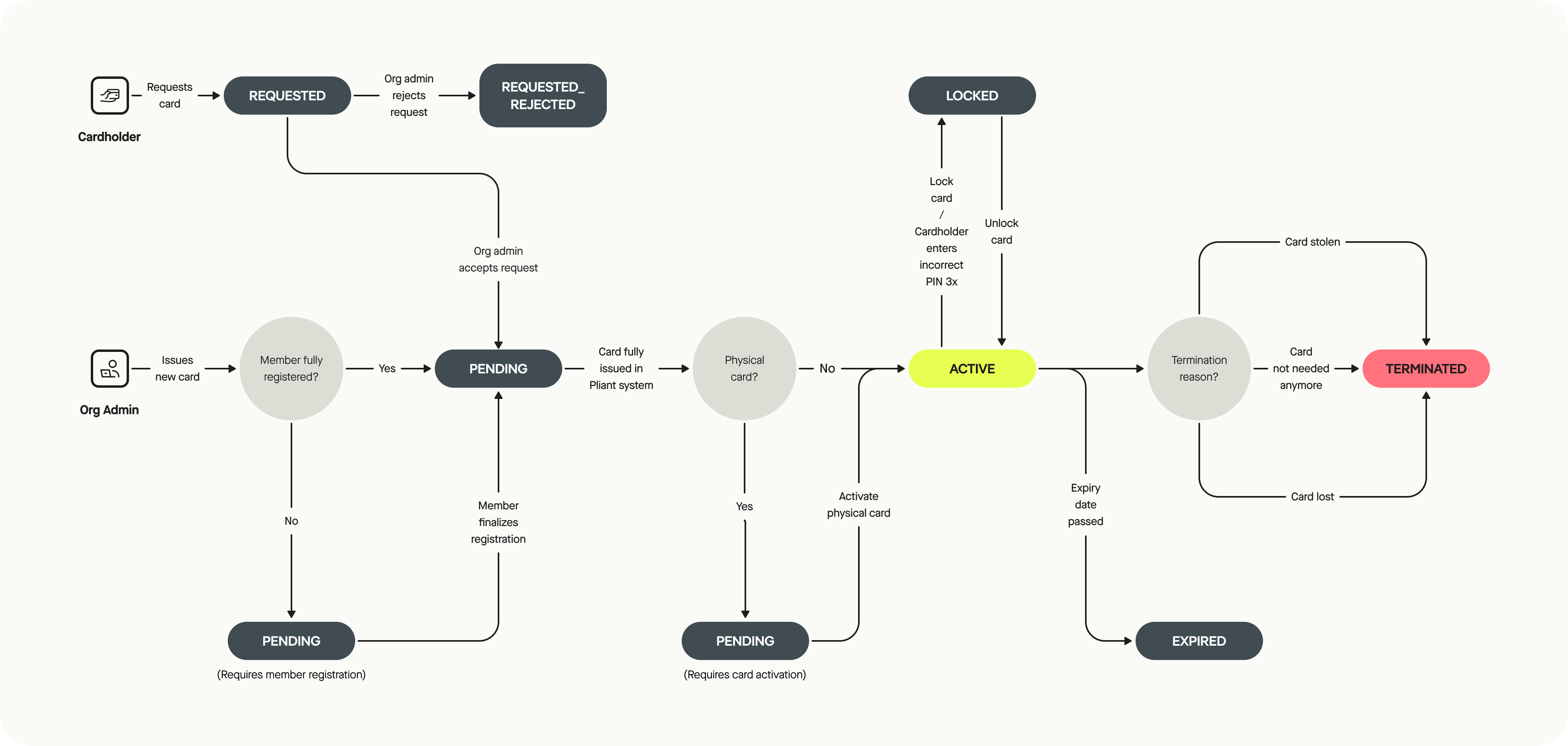
Card Status
PENDING_REGISTRATION- A virtual card was issued for a cardholder who has not completed cardholder registration yet.PENDING_ISSUANCE- Intermediate status betweenPENDING_REGISTRATIONandPENDING_ACTIVATION/ACTIVE. If issuing fails, card remains in this status.PENDING_ACTIVATION- A physical card is issued, but the cardholder has not activated it yet.REQUESTED- The card has been requested, but is not yet approved or rejected.REQUEST_CANCELLED- The card request was cancelled by the cardholder.REQUEST_APPROVED- The card request has been approved by an admin.REQUEST_REJECTED- The card request was rejected by an admin.ACTIVE- The card is active.LOCKED- The card is locked, this can have several reasons, e.g. due to date/time card controls.LOCKED_PIN- The PIN for a physical card was entered incorrectly for 3 times.EXPIRED- The card is expired.TERMINATED- The card was terminated.TERMINATED_LOST- The card was terminated, because it was lost.TERMINATED_STOLEN- The card was terminated, because it was stolen.
Changing card limits and card limit frequencies
When changing the limit or the limitRenewFrequency of a card, you might wonder how this affects the availableBalance of the card. Here is the calculation we do:
- when the
limitof a card is updated, then:availableLimit=newLimit+balance. Where thebalanceis the current account balance calculated as the sum of transactions within the limit renew period (between the resets, i.e.month,quarter,year,total). - when the
limitRenewFrequencyof a card is updated, then we first recalculate the balance as a sum of transactions in the new limit renew period and then use the previous formula:availableLimit=newLimit+balance.
Note that the balance here will be mostly negative. Purchases are negative and refunds are positive. And since this is a credit card, purchases will be the majority of transactions on a card.
Platform Fee Cards
The platformFee refers to a card designed to handle fee-related transactions, such as platform fees or foreign exchange (FX) fees.
Important note: if you notice platform fee cards and their corresponding card check transactions (through relevant API calls or in the Pliant dashboard), we suggest to hide them from the end customer unless actual fees have been charged.
You can find more about those cards here.
Example Data
{
  "cardId": "3fa85f64-5717-4562-b3fc-2c963f66afa6",
  "organizationId": "3fa85f64-5717-4562-b3fc-2c963f66afa6",
  "cardholderId": "3fa85f64-5717-4562-b3fc-2c963f66afa6",
  "type": "VIRTUAL",
  "status": "ACTIVE",
  "label": "my credit card",
  "purpose": null,
  "refNum": "1234",
  "issuingDate": "2023-02-27T10:38:24.801Z",
  "expiryDate": "2023-02-27T10:38:24.801Z",
  "limit": {
    "value": 10000,
    "currency": "EUR"
  },
  "spendingBalance": {
    "value": 0,
    "currency": "EUR"
  },
  "availableBalance": {
    "value": 10000,
    "currency": "EUR"
  },
  "transactionLimit": {
    "value": 5000,
    "currency": "EUR"
  },
  "token": "123456",
  "cardDesign": "PLIANT_VIRTUAL_RED",
  "productRef": "PRD_REF",
  "platformFee": false,
  "limitPeriodEnd": "2023-02-27T10:38:24.801Z",
  "limitRenewDate": "2023-02-27",
  "limitRenewFrequency": "MONTHLY",
  "cardConfig": "ADALOVELACE_VIRTUAL"
}
State Machine
Card Copilot
The Card Copilot feature allows organizations to grant full access to travel purchasing cards to users other than the original cardholder. Copilots can view card details, manage settings, and make transactions with the same privileges as the primary cardholder.
In brief:
- The feature is available only for travel purchasing cards
- It must be activated by an owner/admin via the Modules page
- All activities are tracked in audit logs
How It Works
- Activate the Card Copilot module via the Modules page in the app
- Specify the
copilotsvalue when calling any Issue Card endpoint- You can specify
cardholderIdsand/orteamIds
- You can specify
If the above points are completed no further steps are required and the feature can be used.
Additionally you can:
- Update the copilot(s) of a specific card via the Update Card Copilots endpoint
or
- Specify a new cardholder for a set card via the Claim Card As Copilot endpoint
- This works for users that are already copilots for the card
- It allows you to transfer ownership of a card (e.g.: in the event of a cardholder leaving a company)
More information on how the feature works from the app perspective available in our Help Center. (login required)
Important Remarks
Replacing an existing card
- For physical cards, you can provide a reason:
- if
LOST,STOLENthe current card gets automatically terminated, - if
EXPIRING_SOON,DAMAGEDorDAMAGEDthe current card gets terminated when the new one is activated. Additionally,EXPIRING_SOONcan only be used if the card expires within the next three months. - Physical cards are being replaced automatically shortly before they expire.
- if
- For virtual cards, you can provide
STOLEN(for compromised card details) orOTHER. In both cases, the replaced card gets immediately terminated. - A replacement of a card is only possible if the card is not in one of the following statuses:
PENDING_ISSUANCE,PENDING_REGISTRATION,REQUESTED. Also, single-use cards cannot be replaced at all.
Updated 8 months ago