

Visa Click to Pay
Visa Click to Pay lets cardholders complete checkout at participating merchants without re-entering card details. Pliant manages enrollment on Visa's directory on your behalf. You can let auto-enrollment handle most cases, or drive enrollment changes through the dedicated endpoints below.
Eligibility
Click to Pay is available for:
- Visa cards issued under a card config that has Click to Pay enabled (
clickToPaySupported = true) - Organizations whose Payment Program has Click to Pay activated
Not eligible:
- Mastercard cards
- Any US-issued cards (currently all US cards have
clickToPaySupported = false) - Travel Purchasing Cards
- Card configs where
clickToPaySupported = false
If you are unsure whether your Payment Program is activated, contact your Pliant integration manager before you begin testing.
Card statuses
Every Visa card exposes a clickToPayInfo.clickToPayStatus. The status is always present (it is never null for Visa cards) and takes one of four values:
| Status | Meaning |
|---|---|
NOT_SUPPORTED | Card config does not have Click to Pay enabled. Cannot be enrolled. |
NOT_ENROLLED | Eligible but not currently enrolled. Initial state for newly issued eligible cards, and the resulting state after a successful unenrollment. |
PENDING | An enrollment request is in flight to Visa. Transient state. |
ENROLLED | Active in Visa's Click to Pay directory and usable at participating merchants. |
Lifecycle
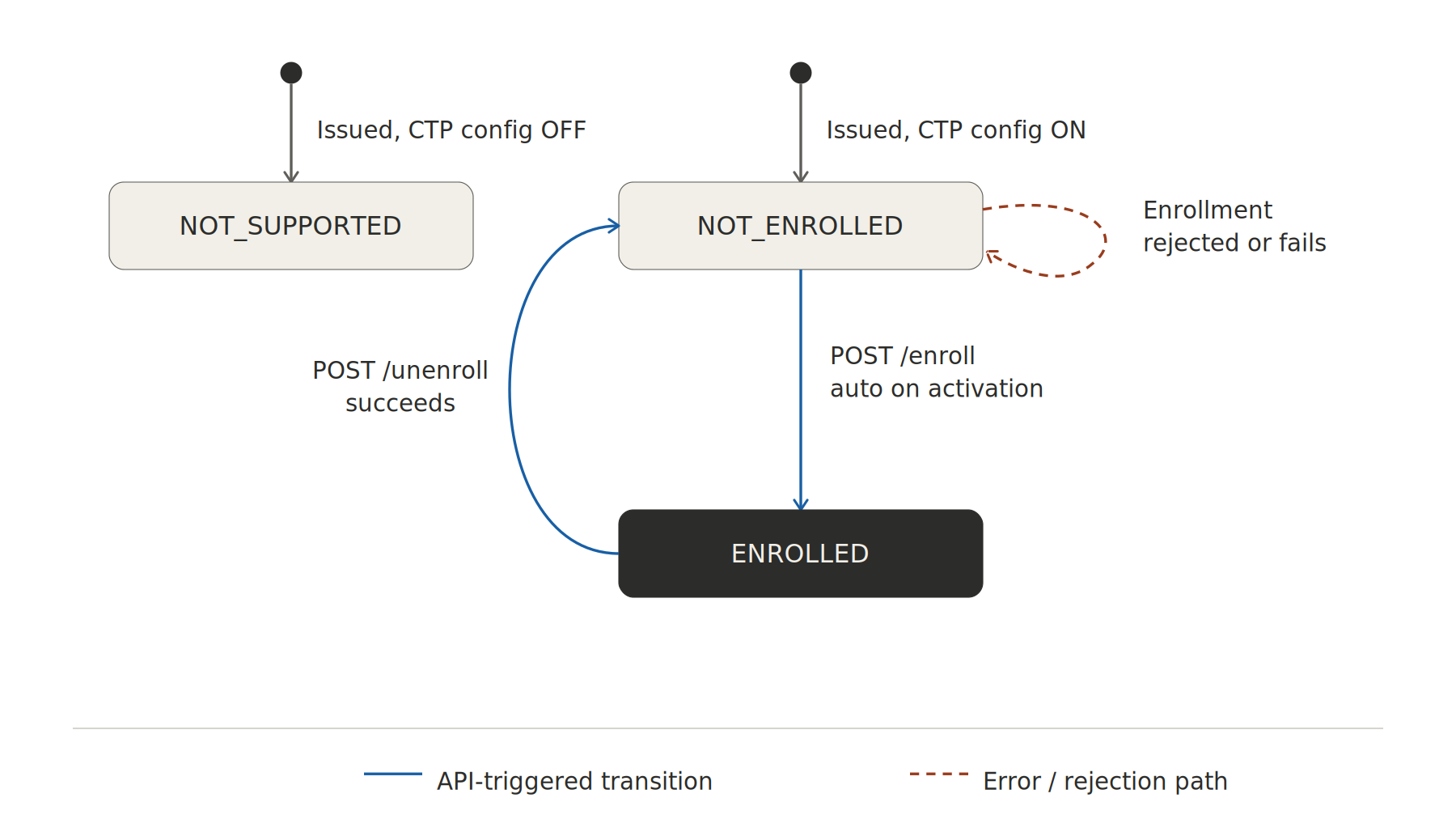
How enrollment is triggered
Newly issued cards
The initial Click to Pay status is taken from the card config at issuance:
- Card config has Click to Pay enabled: the card is created with
clickToPayStatus = NOT_ENROLLED. It is then automatically picked up by Pliant's internal enrollment job once the card is activated. No partner action required. - Card config does not have Click to Pay enabled: the card is created with
clickToPayStatus = NOT_SUPPORTEDand stays that way for its lifetime.
Auto-enrollment runs asynchronously after activation. Do not assume a card is
ENROLLEDat the moment of issuance. Read the status from the card details endpoint or wait for the callback.
Existing cards
You can enroll or unenroll any eligible card at any time:
POST /api/cards/{cardId}/click-to-pay/enrollPOST /api/cards/{cardId}/click-to-pay/unenroll
Both endpoints return the updated clickToPayInfo object including timestamps for the most recent enrollment and unenrollment.
Replacement cards
When a card is replaced, the replacement does not inherit the source card's enrollment. If the source card was ENROLLED, the replacement starts at NOT_ENROLLED and goes through the standard auto-enrollment path on activation. Reconcile on the new cardId rather than assuming continuity.
Address handling
Click to Pay requires a billing address. Pliant uses the cardholder's organization billing address implicitly. You do not need to send address fields with enrollment requests.
Callbacks
Click to Pay status transitions emit callbacks on your card update webhook. The payload includes the full clickToPayInfo object, so you can sync your local state without an extra GET. Listen for transitions in any direction (enroll, unenroll, fail back to NOT_ENROLLED), not only the success path.
Testing
Click to Pay cannot be tested end-to-end on the sandbox environment.**
Specifically on sandbox:
- Auto-enrollment on issuance does not run end-to-end
- Enrollment timestamps and
ENROLLEDstatuses are not authoritative - Visa's hosted Click to Pay user experience cannot be exercised against sandbox cards
Recommendation: Run shape and contract tests on sandbox, then validate the enrollment lifecycle in production with a small set of real cards. For testing in production, we have the possibility to enable and enroll cards for a specific organization upon request.
Common pitfalls
- Treating
NOT_ENROLLEDas failure. Right after issuance,NOT_ENROLLED(and brieflyPENDING) is expected. Wait for the callback or poll briefly before raising an error. - Assuming Mastercard support.
clickToPayInfois only meaningful for Visa cards. - Relying on sandbox results. Always confirm enrollment behaviour in production.
- Adding
nullchecks forclickToPayStatus. For Visa cards the API always returns one of the four values above, so anullbranch is dead code. If you ever seenull, treat it as a Pliant-side defect and report it rather than handling it as a valid state. - Replacement cards. Replacements start at
NOT_ENROLLEDeven if the source card wasENROLLED.
Reference
Updated 5 months ago